Kroger · Principal designer · 2024–now
Item Management Experience
Retiring legacy item systems without breaking a 2.2M-item operation
Summary
IME is Kroger’s platform for everything about an item: setting it up, maintaining its data, finding it, and checking it against business rules. It’s replacing four legacy systems that associates had to switch between all day. In 2026 I’m leading the work that retires the first of them, PIM, one user group at a time.
My role. Principal designer since IME began in mid-2024, and primary designer of the GTIN record, the core item-detail and editing experience. In 2026 I also lead the PIM retirement: migration planning, onboarding, and an AI assistant to help each group across.
- Timeline
- Mid-2024 to now. PIM retires at the end of fiscal 2026.
- Team
- 3 designers, including me, across multiple Scrum teams; 2 design interns I managed; 4 product managers; and about 8 developers
- Users
- 8+ specialist roles, from item setup to signage, plus 400+ read-only users
- Client
- Kroger Technology & Digital
- $1.6M/yr in PIM licensing fees, gone when it retires
- 400+ read-only users, most of them new to item data
- ~500 associates with access, winter 2025–26
As of Oct 2026
The problem
Four systems for one item
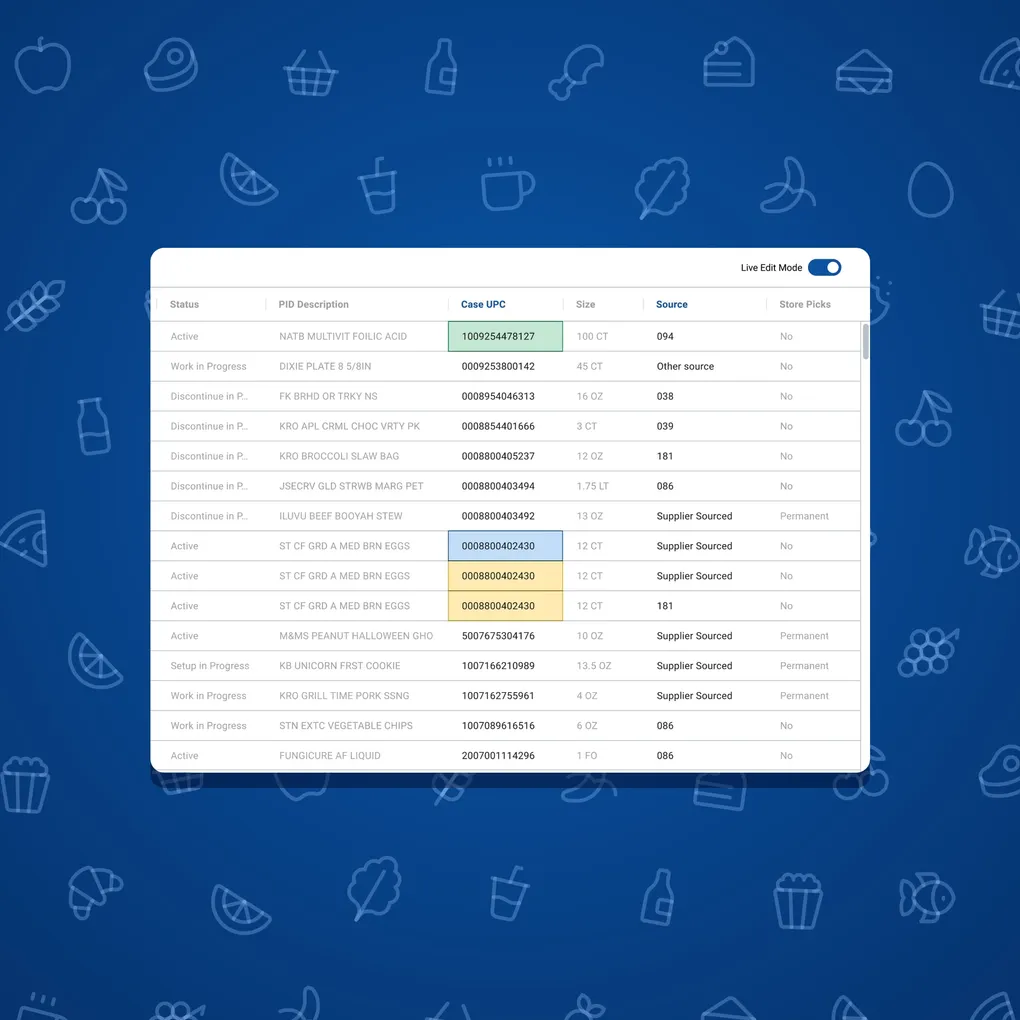
Before IME, everything about an item at Kroger was split across four legacy applications: Item Composite, Venus, PID, and PIM. Setting up an item, maintaining its data, finding it, validating it, and handing it to the next team meant switching between them constantly. The business rules lived outside the workflow, so data quality suffered, and training a new associate was complicated.
PID is a green-screen database app. PIM is licensed software that costs Kroger $1.6M a year. Between license limits and tools that took real skill to use, plenty of people who needed item data simply didn’t have it.
IME is replacing all of that, one system at a time, for 2.2M+ items, including the 1.1B+ attributes in PID and PIM. It serves 8+ specialist roles with very different work: item setup, category management, fulfillment centers, point of sale, scale labels, signage, and more.
- Item Composite
- Venus
- PID
- PIM
Research
Learning what it takes to leave
Replacing a system people have used for years only works if the new one covers what they actually do in the old one. So IME started with a baseline study of legacy GTIN workflows: where people hit friction, which attributes they really used, and where the work was wasted. I wrote the research plan and set up the interviews and usability sessions.
PID, edit by edit
In early 2025 I defined what it would take to move people off PID. I documented how PID was used, interviewed the people who used it, and cataloged how they made edits. Those findings became requirements, and the requirements became equivalent workflows in IME, delivered as a prototype, a roadmap, and dev-ready Figma.
In PID, every screen is a transaction with a four-letter code. An edit means calling up the right one, choosing an action from a list like Q, U, A, C, X, L, and working through abbreviated fields like STR SHIP HGHT. Function keys jump to the next screen, and each screen holds a different slice of the same item. People who’d used it for years knew the codes by heart.
IME puts that data under plain labels, in one record. It also keeps the old codes in the navigation, as in General (PTCO) and Item status (PTST), so people who think in PID can still find their way.
PTDP      P.I.D.    PURCHASING/DISTRIBUTION INFO   03/17/25  13:39
TRX: PTDP  MEN: PID  KEY: 00012345678905                    PF:
ACT: *     (Q,U,A,C,X,L)                                      0
------------------------------------------------------------------
SRC ID----: 014                   GTIN CASE----: 00012345600017
LINE NUM--: 00512
DESC------: SPRKLG WTR LIME 12PK  ITEM SIZE----:   12/12 FO

STR UNT PK---:    1               CASE PACK----:    1
VND PAL QY---:  180               SHELF LIFE---:  365
BUY MULT-----:  180               HAZARD CD----:

STR SHIP LGTH:  10.40 (IN.)
STR SHIP WDTH:   7.85 (IN.)
STR SHIP HGHT:   5.10 (IN.)       STR SHIP CUBE:  0.24 (CU. FT.)

CASE GROSS WT:   9.25             ADD DATE-----: 03/18/15
CASE NET WT--:   8.90             MAINT DATE---: 03/17/25
PF14=PTC1  15=PTC2  16=PTDC  17=PTTC  18=PTST  20=PTIX
QUERY FUNCTION COMPLETE
Fulfillment Center
Dimensions & weight
Length (in)
Width (in)
Height (in)
Gross weight (lbs)
Volume (ft³)
The GTIN record
The record everything else hangs on
The GTIN record is the core of IME: the page where an item’s data lives and where people change it. I’m its primary designer, which means I own how edits work everywhere in it, including task-driven editing, Save Draft for edits that can’t happen in one sitting, and the record’s interaction patterns.
An item has hundreds of attributes, so every edit is marked where it happens: the field is tinted, and its section is flagged in the side navigation. Business rules are checked as people work, including rules that span fields. And Discard, Submit, and Save as Draft stay pinned to the bottom of the page. The rules finally live inside the workflow instead of beside it.
By case GTIN
By consumer GTIN
Fulfillment Center
Consumer details by consumer GTIN
Dimensions & weight
Length (in)
Width (in)
Height (in)
Gross weight (lbs)
Volume (ft³)
Replacement item details
Replacement item GTIN
Replacement type
Conversion factor
Facility ID
Required when Replacement item GTIN is populated.
Around the record
I also own Advanced Search enhancements, from requirements through results design and build reviews. I refined task management: creating tasks, confirmation emails, success and failure messages, and batch processing. And I set the sitemap and naming for Bulk Edit, Utilities, and the item, division, and warehouse group workflows.
One product, many teams
IME is built by three designers across multiple Scrum teams, so keeping it consistent takes deliberate work. Since September 2025 I’ve co-led the IME Design–Dev Jam series, where designers and developers settle shared standards: tables, search, navigation, spacing, and hierarchy.
Quick View
Built to stop the toggling
Even with IME in hand, people kept toggling back to PID. A design jam in November 2025 dug into why: cognitive load, and attributes that were hard to find. Quick View is the answer I designed: a personalized attribute panel that sits in the side panel, next to whatever page of the record someone is on. I built working prototypes and led its design review in April 2026.
Each person picks the attributes they want, grouped to match the record’s key bar (case GTIN, consumer GTIN, division, and warehouse), and drags the groups into their own order. It’s saved as their preference, so it follows them to every record. Deep links jump to neighboring tools, including SATH. Keyboard shortcuts switch between the menu and Quick View, and a short onboarding carousel stays put until someone adds their first attribute.
It’s the whole project in miniature. If the new system makes one common task slower, people keep the old one open, and the old one never retires.
QuickView
Case GTIN attributes
Consumer GTIN attributes
Images
Division attributes
Deep links
General
Consumer details by consumer GTIN
Consumer basics
Family tree
Manufacturing
Compliance
Lifecycle
The migration
Moving PIM’s 8 user groups across
In 2026 I lead the PIM retirement arm of IME. PIM has 8 user groups, and we’re moving them one at a time. 2 have moved, 1 more moves in early November, then 3 in December and 2 in January. That last move retires PIM at the end of Kroger’s fiscal 2026. PID’s user groups follow in 2027, led by another senior designer on the team.
I led the onboarding strategy, coordinated who owned which part of it across IME’s stakeholders, and guided the IME Overview Guide, the fulfillment-center onboarding guides, and role-based training. IME’s Q2 2026 impact report credits its adoption to that onboarding, training, and migration support, along with workflows built around how people work.
An assistant for the move
With our summer design intern, I built an AI assistant in Kroger’s internal Gen-AI Studio for onboarding and troubleshooting. It’s grounded in IME’s documented processes and workflows, plus how-to content for the app, so people in the middle of a migration have somewhere to ask. About 15 people are onboarding with it now, and about 40 more will be by the end of 2026.
The surprise
400 people we didn’t plan for
The biggest outcome so far wasn’t on the roadmap. More than 400 people use IME read-only, as their reference for item data. Most of them are new to it. Before, they were shut out: there weren’t licenses for them, or the old tools, especially PID, were too clunky for a quick look-up. In effect, we’ve democratized item data at Kroger.
What didn’t work
IME wasn’t our first try
IME started as an exploration, not a product. Our senior design manager asked a small group of designers to audit the whole lifecycle of an item at Kroger: how new items get suggested, vetted, approved, brought in, set up, cataloged, and managed. We logged every team, system, and process involved, then picked the stretch with the most pain and started designing an app for item approval. I was only partly involved at that stage; most of my time was still on Archon.
It went slowly. Nothing was documented, and there was no single source of truth for how any of it worked. Systems had been built in place over the years, wrapped in Kroger-specific acronyms and code names, so every process had to be tracked down one person at a time, and the accounts often contradicted each other. After about six months of wireframes, we’d missed some early deadlines.
The record we were piecing together turned out to be valuable on its own. It was the first full picture of those processes and the problems in them, and it helped keep the work funded. But leadership needed faster impact, so we set the approval app aside. I explored new-item setup while two other designers looked at other parts of the lifecycle. When we compared paths, the biggest win was the most concrete one: modernize PID and PIM. PID was so old and hard to use that it worked as a gate. Many people who needed item data to do their jobs couldn’t get it themselves, so they had to ask someone who could run PID to look it up for them. PIM had steep license fees and its own usability problems.
What I took from it: a new workflow designed on top of undocumented processes has no edges, so every answer opens another question. Replacing systems that already exist gave us edges: real users, real screens, and a cost we could point to.
Results
Retiring PIM, and opening item data up
- $1.6M a year in PIM licensing fees, gone once PIM retires at the end of fiscal 2026.
- 2 of 8 PIM user groups moved to IME, and the rest scheduled through January.
- ~500 associates with IME access as of winter 2025–26.
- 400+ read-only users, most of them new to item data.
- An AI onboarding assistant with ~15 users now and ~55 expected by year-end.
- 1 of 4 legacy systems retired by the end of fiscal 2026, with PID next in 2027 and the other two planned for 2028.
PIM’s last user groups move in January, which finishes the retirement I’ve been leading. I’ll update this page once PIM is retired.
The bigger picture
One of three platforms, one item ecosystem
IME answers what an item is. It manages each GTIN’s attributes and publishes that data to the systems around it, including Archon, which decides where an item is sold online. Before fulfillment-center teams had IME access, they relied on Archon for item information.
- What is this item? IME Led
- Where is it sold online? Archon Led
- Which stores can carry it? SATH Co-designed